ShadowMap supports a secure, read-only integration with Cloudflare to automatically discover and monitor domains, sub-domains, DNS records, and origin infrastructure. This integration allows ShadowMap to ingest authoritative data directly from Cloudflare, ensuring comprehensive and continuously updated visibility of your external attack surface.
This guide walks you through creating a Cloudflare API Token with the required permissions and configuring ShadowMap to use it.
Step 1: Create a Cloudflare API Token
Sign in to the Cloudflare Dashboard.
Click your profile icon in the top-right corner and select My Profile.
Navigate to API Tokens.
Click Create Token.
Choose Create Custom Token.
Step 2: Configure API Token Permissions
Configure the token with read-only permissions as outlined below.
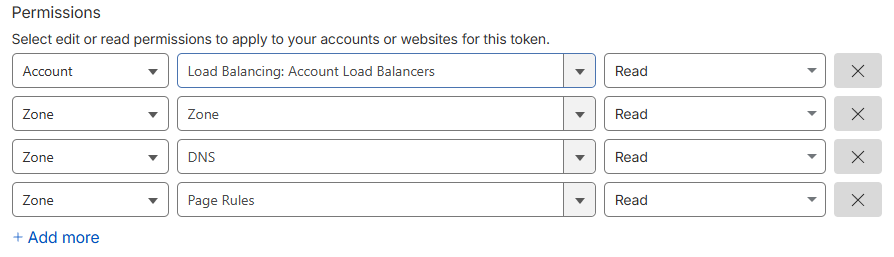
Scope
Include access to the specific Cloudflare account that manages the domains you want ShadowMap to monitor
(or all accounts, if centrally managed)
Once configured:
Click Continue to summary
Review the permissions
Click Create Token
Copy the token value immediately (it will not be shown again)
Step 3: Identify Your Cloudflare Account ID
To find your Cloudflare Account ID.
Open any domain in the Cloudflare dashboard
Locate the Account ID in the account or domain overview section
Step 4: Configure Cloudflare in ShadowMap
Log in to your ShadowMap dashboard.
Navigate to Settings → Cloud Sources.
Select Cloudflare.
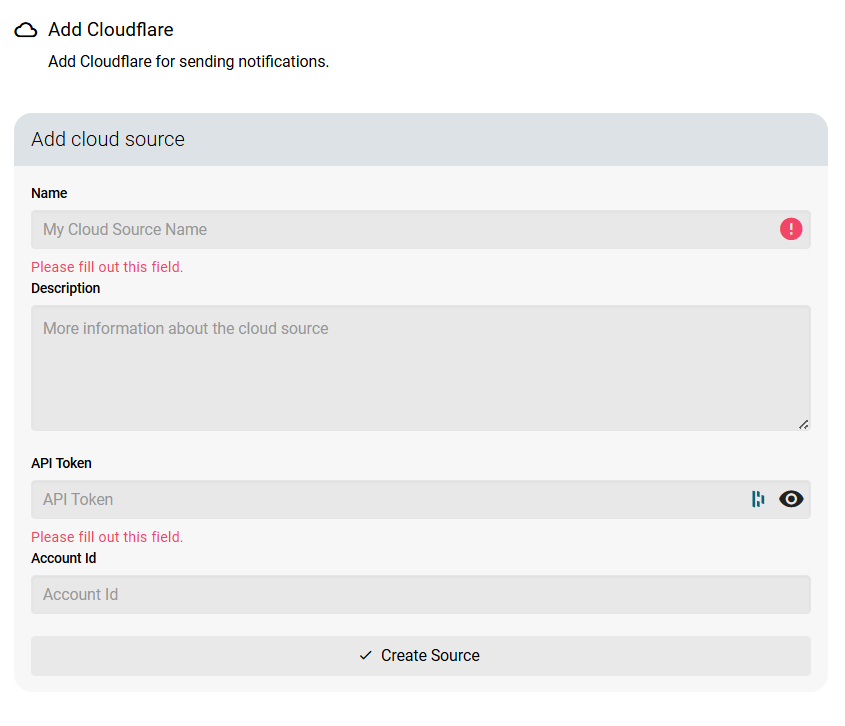
Click Create New Configuration.
Enter:
Configuration Name
Cloudflare API Token
Cloudflare Account ID (if applicable)
Click Create Source to enable the integration.
Once enabled, ShadowMap will begin ingesting Cloudflare data automatically.
How Cloudflare Data is Used in ShadowMap
After the integration is active, ShadowMap retrieves and correlates Cloudflare data to enrich your external attack surface inventory.
Domain & Sub-Domain Discovery
Managed domains (zones)
DNS records, including:
A / AAAA records
CNAME records
TXT records (for contextual intelligence)
Automatic identification of sub-domains, including newly added or previously unknown entries
Origin Infrastructure Mapping
Extraction of origin IP addresses from DNS and routing configurations
Detection of:
Direct-to-origin exposure risks
Cloudflare bypass paths
Shared origin infrastructure across multiple domains
Exposure Context & Metadata
Proxy status (proxied vs DNS-only)
Mapping of protected versus unprotected endpoints
Correlation with certificates, IP intelligence, and hosting providers
These elements are then:
Continuously monitored for changes.
Automatically included in ShadowMap's scanning engine.
Evaluated for vulnerabilities, misconfigurations, and threats.
Was this article helpful?
That’s Great!
Thank you for your feedback
Sorry! We couldn't be helpful
Thank you for your feedback
Feedback sent
We appreciate your effort and will try to fix the article