ShadowMap supports a secure, read-only integration with Google Cloud Platform (GCP) to automatically discover and monitor cloud-based internet-exposed assets. This integration enables ShadowMap to ingest authoritative inventory and networking data from GCP, ensuring accurate and continuously updated external attack surface coverage.
This guide walks you through creating a GCP Service Account with least-privileged permissions and configuring ShadowMap to use it.
Step 1: Create a GCP Service Account
Sign in to the Google Cloud Console.
Select the appropriate Project (or create a dedicated project if required).
Navigate to IAM & Admin → Service Accounts.
Click Create Service Account.
Provide:
Service account name:
shadowmap-integration(example)Description: Read-only asset discovery for ShadowMap
Click Create and continue.
Step 2: Assign Read-Only IAM Roles
Assign the following read-only roles to the service account to allow asset and network discovery.
Viewer (
roles/viewer)Compute Viewer (
roles/compute.viewer)DNS Reader (
roles/dns.reader)Storage Viewer (
roles/storage.viewer)
These roles allow ShadowMap to enumerate compute resources, networking components, DNS zones, and storage endpoints without modification privileges.
After assigning roles, click Done.
Step 3: Create a Service Account Key
Open the newly created service account.
Go to the Keys tab.
Click Add Key → Create new key.
Select JSON format.
Click Create.
A JSON key file will be downloaded. This file contains the credentials ShadowMap will use to authenticate with GCP.
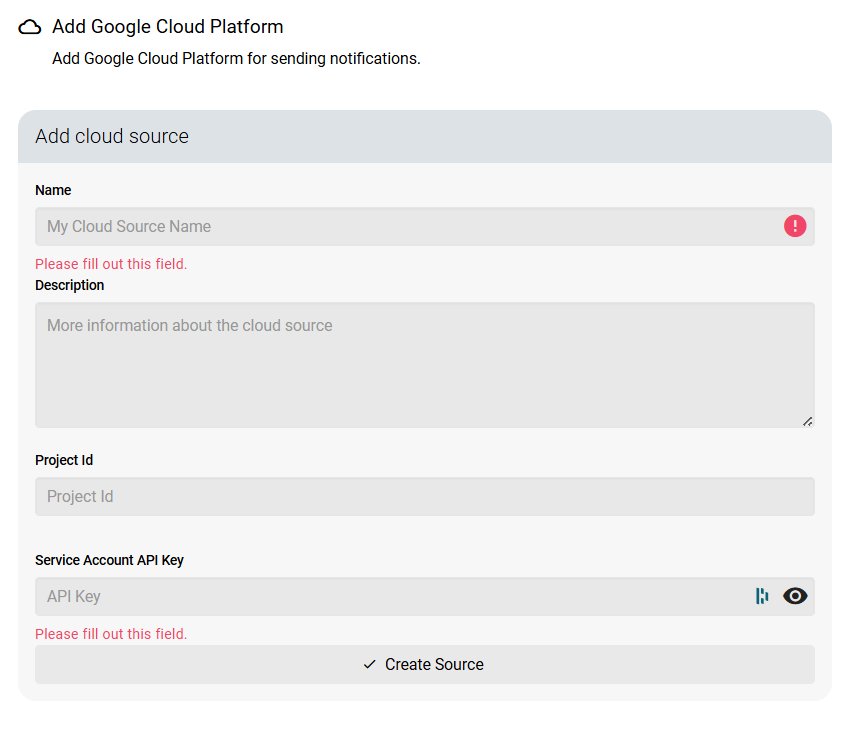
Step 4: Configure GCP in ShadowMap
Log in to your ShadowMap dashboard.
Navigate to Settings → Cloud Sources.
Select Google Cloud Platform.
Click Create New Configuration.
Provide:
Configuration Name
GCP Project ID
Service Account JSON key (uploaded or pasted, depending on UI)
Click Create Source to enable the integration.
Once enabled, ShadowMap will begin ingesting GCP data automatically.
How GCP Data is Used in ShadowMap
After the integration is active, ShadowMap retrieves and correlates GCP asset and network data to enrich your external attack surface inventory.
Compute & Public Infrastructure
Compute Engine VM instances
Associated external IP addresses
Instance metadata relevant to exposure analysis
Network & Exposure Mapping
VPC networks
Forwarding rules and public load balancers
Cloud Load Balancing public endpoints
Mapping of internet-facing services to backend infrastructure
DNS & Sub-Domain Discovery
Cloud DNS managed zones
DNS record sets (A, AAAA, CNAME, etc.)
Automatic discovery of sub-domains associated with GCP-hosted services
Storage & Internet Accessible Services
Cloud Storage buckets
Public bucket endpoints and URLs (where applicable)
Correlation of storage exposure with DNS and IP intelligence
These elements are then:
Continuously monitored for changes.
Automatically included in ShadowMap's scanning engine.
Evaluated for vulnerabilities, misconfigurations, and threats.
Was this article helpful?
That’s Great!
Thank you for your feedback
Sorry! We couldn't be helpful
Thank you for your feedback
Feedback sent
We appreciate your effort and will try to fix the article